Sixty-two percent of developers now use AI tools in their daily workflow, according to the Stack Overflow 2024 Developer Survey. That adoption rate has one less-discussed side effect: a new class of bugs that behave differently from bugs in hand-written code, and a growing number of engineers who spend more time debugging AI output than writing the original feature.
This guide explains how to debug AI-generated code effectively. It covers why AI code fails in specific, predictable patterns, gives you a concrete framework for tracing those failures, and lists the tools that actually shorten the cycle. No promises of magic fixes. Just methods that work.
Why AI-Generated Code Is Hard to Debug
The difficulty is not that AI tools write bad code. Sometimes they write very good code. The difficulty is that you cannot reason about their intent the way you can reason about a colleague's.
When a developer writes a function, there is a chain of decisions behind it: the edge case they chose to ignore, the error they decided to swallow, the assumption they made about the data shape. You can ask them. You can look at the surrounding commits. You can trace the logic back to a product requirement.
AI output has none of that trail. The model produced something that looks correct. It compiles. It passes a basic sanity test. And then at 2 AM on a Tuesday it silently drops a payment because no one validated a null reference three function calls deep.
There is also a subtler problem. GitClear analyzed 153 million changed lines of code authored between 2020 and 2023 and found that code churn (the percentage of lines that get reverted or deleted within two weeks of being written) roughly doubled in AI-era codebases compared to the 2021 pre-AI baseline. More code is being written, accepted, and then corrected. The debugging loop is not shrinking despite the productivity gains.
The Five Most Common Bug Categories in AI-Generated Code
Across production AI-assisted codebases, the same bug types show up repeatedly. Recognizing them cuts debugging time significantly.
1. Hallucinated APIs and Non-Existent Methods
AI models are trained on code from across the internet: code written against old library versions, pre-release APIs, private SDKs, and frameworks that were renamed. The model learns associations between function names and patterns and then reproduces them confidently, even when the specific method does not exist in your installed version.
You will see this as a NameError, an AttributeError, a "method not found" exception, or a runtime crash right at the import line. The fix is usually quick once you identify it. The danger is accepting AI output at face value and spending an hour tracing a supposed library quirk before checking the official docs.
Check every external method call the AI produced. If you do not recognize it, look it up in the official documentation of the installed version, not just web search results. Version mismatches are the single fastest bug to close once found.
2. Flawed Logic at Edge Cases
AI models generate code that handles the expected case very well. The happy path works. The problem surfaces when the input is empty, when a list has one item instead of three, when a user sends a float where the model assumed an integer, or when the data simply does not match the structure the model assumed.
These bugs are particularly frustrating because the code looks logically sound. Off-by-one errors in loops, index access without bounds checks, and assumptions about data being present are all common. The code reflects patterns from training data: patterns written for known contexts, not your specific data.
Write tests for the edge cases first. Zero items, one item, negative numbers, null values, strings where numbers were expected. AI-generated code almost always fails at least one of them.
3. Silent Failures From Missing Error Handling
AI tools write code that gets the job done under normal conditions. Error handling tends to be an afterthought, or completely absent. The model may wrap a block in a try/catch that swallows the exception and continues execution. The error disappears, the function returns a default value, and the bug propagates silently for hours before anyone notices.
This is one of the most damaging failure modes in production AI-generated codebases. A database write fails quietly. An API call times out without retry logic. A file write fails without surfacing the error to the calling code.
Audit every error handler in AI-generated code. Ask what happens when the exception fires. Make sure the failure surfaces to the right level, not just to a log file nobody reads.
4. Security Gaps at Input Boundaries
AI models produce code that matches common patterns. Security-conscious code is less common in training data than functional code. The result: AI-generated functions regularly skip input validation, miss SQL injection risks, mishandle authentication checks, and fail to escape user-supplied data properly.
These are not always visible bugs; they are code that works while being exploitable. You will not find them by running your test suite. You find them by auditing with intent: tracing every place user input enters the system all the way through to every place it gets used.
Common patterns to look for: unparameterized database queries, missing authentication checks before resource access, unvalidated form fields going directly into file paths, and secrets appearing in error messages or log output.
5. Race Conditions and Shared-State Bugs
Asynchronous AI-generated code has a specific failure pattern: the model understands the individual operations but misses the ordering guarantees required. Async functions get awaited in the wrong sequence. State mutates concurrently without protection. A cached value gets invalidated between the read and the write.
These bugs are the hardest to reproduce and the hardest to trace because they are timing-dependent. They appear intermittently under load. The same request that fails consistently in production never fails locally.
When debugging async AI code, look explicitly for shared mutable state accessed from multiple coroutines or threads, missing locks or semaphores, and async operations where the result is used without awaiting.
What the Data Shows About Debugging AI Code
The Stack Overflow 2024 Developer Survey asked more than 30,000 professional developers about their challenges with AI code assistants. Two findings stand out for anyone debugging AI-generated code.
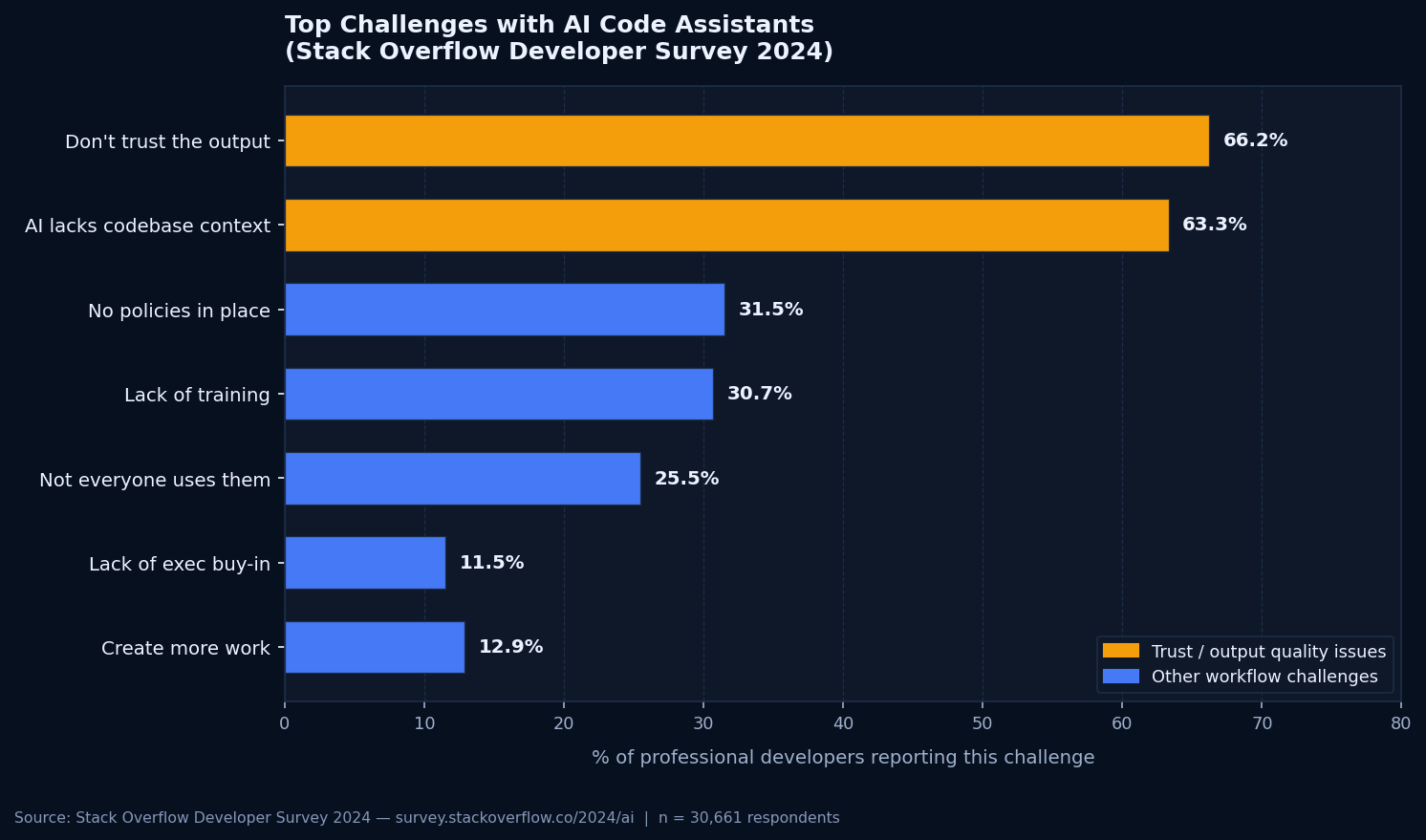
These numbers directly explain why debugging AI code is hard. The tool confidently produces code that misunderstands your data model, your error conventions, and your existing abstractions. Sixty-six percent of developers know this from experience. Debugging is the process of discovering exactly which assumptions were wrong this time.
A Step-by-Step Framework to Debug AI Code
This process works consistently across languages and AI tools. It is not a rigid checklist: it is an ordered set of priorities that prevents the most common time-wasters.
Pin down the failure boundary
Before changing a single line, identify exactly where the failure occurs. Run the test that demonstrates the bug. If there is no test, write one. Get a clear, reproducible failure before you start tracing. This step sounds obvious. It saves hours; developers who skip it end up chasing the wrong function because the error message pointed to a consequence rather than the cause.
Read the code without assumptions
Read every line of the AI-generated function as though you did not know what it was supposed to do. Ignore comments. Ignore method names. Follow the actual data flow. AI models name functions clearly and write helpful comments. Those names and comments can mislead you when the implementation does not match. Read what the code does, not what the AI says it does.
Check every external dependency
For every method call to an external library or framework: verify it exists in the installed version, check the actual signature in the documentation, and confirm the return type matches what the code expects. This takes five minutes. It closes the hallucinated-API category of bugs entirely.
Test the edges
Write tests for boundary conditions: empty inputs, null values, single-item collections, maximum-size inputs, and invalid types. Run them. Expect failures. AI-generated code almost always has at least one edge-case gap; these are the bugs that cause production incidents, not the happy-path ones.
Audit the security-sensitive paths
Trace every path where user input enters the system. Follow it to every sink: database queries, file operations, external API calls, log output. Check for validation, escaping, and parameterization at each point. This step is not optional for any code that handles external input. Functional correctness and security correctness are different things.
Write a regression test before fixing
Before you fix the bug, write a test that fails because of it. Then make the test pass. This practice prevents the same AI bug from reappearing when the code gets regenerated or modified, which happens frequently in AI-assisted workflows where developers re-prompt to make changes.
Tools That Help You Debug AI-Generated Code
The right tools do not change the debugging process, but they surface problems faster. Here are the ones that deliver consistent value across AI-generated codebases.
Test runners
pytest for Python, Jest or Vitest for JavaScript, JUnit for Java. The single highest-value investment for any AI codebase that lacks tests. Get a reproducible failing test before anything else.
Static analysis
ESLint for JavaScript/TypeScript, Pylint or Ruff for Python, SonarQube for multi-language teams. These catch common AI anti-patterns: unused variables, unreachable code, parameter mismatches, before runtime.
Security scanners
Semgrep with community rulesets catches SQL injection risks, path traversal patterns, and improper credential handling in AI-generated code. Bandit does the same for Python. Neither replaces manual auditing, but both find obvious failures quickly.
IDE debugger
Use your debugger to step through AI-generated code under the actual failing test case. Watch the real data values at each step. Slower than reading, but it bypasses the assumptions your brain makes when reading code.
AI assistants for explanation
Copilot Chat and Claude can explain what a confusing block of AI-generated code is attempting. Use those explanations as a starting point, not a final answer. An AI explaining its own code is not a reliable source of truth about whether that code is correct.
Git history and blame
In AI-assisted workflows, code often gets regenerated multiple times. Checking git history shows which version introduced the bug and which prompt context was active at the time. Invaluable for understanding why a specific pattern appeared.
How to Write AI Code That Is Easier to Debug
The best debugging session is the one you avoid. A few changes to how you prompt AI tools make a real difference in the quality of what comes back.
Give the AI explicit context before prompting. Paste in your existing type definitions, the interfaces your function must satisfy, and a clear description of the edge cases that matter. The more context the model has, the fewer assumptions it makes. Underprompted AI tends to invent sensible-looking defaults that do not match your actual system.
Specify error-handling behavior explicitly. "Handle the case where the input is null" or "raise an exception if the API call fails, do not swallow the error" produces substantially better output than leaving error handling unspecified. The model will write error handling if you ask for it. It often skips it if you do not.
Request tests alongside the implementation. Asking for both the implementation and its unit tests in the same prompt forces the model to reason about testable behavior. That tends to produce fewer edge-case gaps than asking for the implementation alone.
Review every block before committing. Not a scan: a full read, including the error handlers, the type coercions, and the boundary conditions. AI code that looks right at a glance is often the code that fails in production. The thoroughness of your review is the main defense between generation and deployment.
Set up a pre-commit hook that runs your static analysis tools before every commit. AI-assisted workflows generate a lot of code quickly. Static analysis running at commit time catches the most common anti-patterns before they reach review, not after.
When Debugging Stops Making Sense
Some AI-generated codebases reach a point where patching individual bugs is not the right approach.
If failures are intermittent and appear only under production load, if fixing one thing consistently breaks something else, if the codebase has no test coverage and every change feels risky; those are signs of structural problems that bug-by-bug debugging will not resolve.
The same Stack Overflow survey found that 63.3% of developers say AI tools lack sufficient context of their codebase. In large AI-generated projects, that context gap can produce cascading architectural decisions that individually look reasonable but collectively make the system fragile. You can patch each symptom. The underlying fragility remains.
At that stage, a systematic production-readiness review, covering architecture, security, test coverage, and error handling across the whole codebase, is more efficient than continued debugging in isolation. That review surfaces the structural issues that individual bug fixes keep circling around without resolving.
If you have reached that point with an AI-generated or vibe-coded project, that is exactly what we do at Prompt2Prod.AI. A focused production-readiness assessment surfaces every critical gap and gives you a prioritized plan for what to address first.