
Someone on your team will notice a competitor changed their pricing. Eventually they will see it while doing something else, mention it in a Slack message, and a few people will nod. Three weeks later a sales rep asks why you had no idea about the new enterprise tier that launched a month ago. This is not a discipline problem. It is a systems problem. Nobody has a reliable process for watching competitors because manual checking is tedious, inconsistent, and easy to deprioritize.
This tutorial walks through building a scheduled AI agent in Python that handles the job automatically. It scrapes competitor pricing pages on a weekly cron schedule, parses their press release RSS feeds, runs any detected changes through an LLM to filter genuine signals from noise, and posts a formatted summary to a team Slack channel. The complete source is about 250 lines of code across six focused modules. By the end you have a production-ready pipeline you can deploy with a GitHub Actions workflow and maintain without touching more than a config file.
The Problem with Manual Competitor Monitoring
Manual competitive monitoring fails in a specific, predictable way. The person assigned to it checks religiously for two weeks, then gets pulled into a product sprint. The tab with six competitor pricing pages stays open in a browser window until the laptop restarts. Nothing breaks visibly; the absence of information is silent.
Pricing changes are the highest-priority signal most teams miss. A competitor drops their entry plan price by 30% on a Thursday afternoon. Your sales team finds out on Monday when a prospect asks why you are so much more expensive. A new enterprise tier that solves exactly the objection your prospects raise most often gets launched via a press release that nobody read. These are not edge cases.
The fix is not hiring someone to check tabs. The fix is removing the human from the loop for the data-gathering step and putting them back in only for the decision-making step. That is what this agent does.
What This Agent Does
The pipeline has five stages. A cron trigger or GitHub Actions workflow fires weekly. The scraper fetches the HTML content of each competitor pricing page and parses each target RSS feed. The delta detector compares each new snapshot against a stored hash baseline, isolating what actually changed. The LLM evaluator sends those diffs to a language model with a structured prompt asking it to rate significance and produce a plain-text summary. The Slack notifier builds a Block Kit message from the scored results and posts it to your chosen channel. Every stage feeds the next and the only output you see is a well-structured Slack summary once per week.
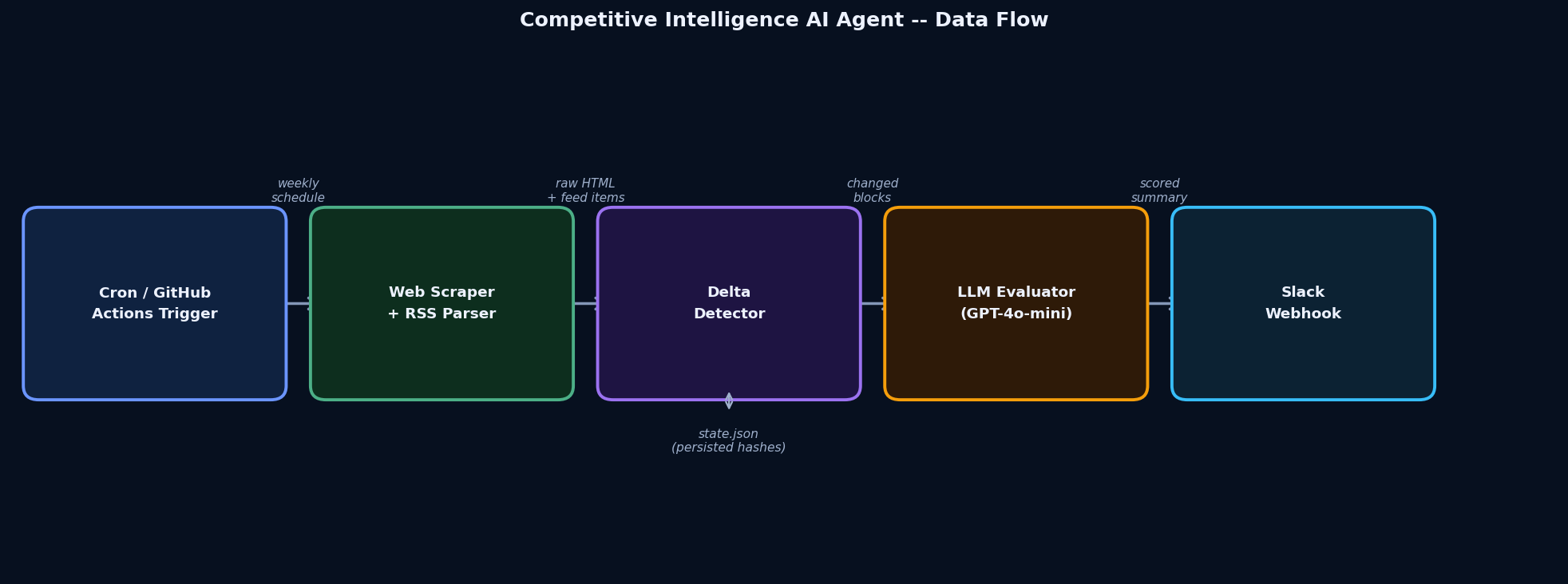
Project Structure and Dependencies
The project is intentionally flat. Six Python modules, one config file, and a GitHub Actions workflow. No framework, no database, no message queue. State persists in a single JSON file between runs.
ci_agent/
  config.py          # target URLs and tuning constants
  scraper.py         # pricing page fetcher
  rss_reader.py      # RSS/Atom feed parser
  delta_detector.py  # hash-based change detection and state persistence
  llm_evaluator.py   # LLM significance scoring
  slack_notifier.py  # Slack Block Kit message builder and sender
  agent.py           # orchestrator entry point
  state.json         # created on first run, updated each week
  .env               # API keys (never commit this)
  requirements.txt
.github/
  workflows/
    ci-agent.yml
Installing dependencies
This project requires Python 3.10 or later. Pin your dependencies to specific versions in a production deployment.
requests==2.32.3
beautifulsoup4==4.12.3
lxml==5.2.2
feedparser==6.0.11
openai==1.56.0
python-dotenv==1.0.1
Configuring your targets
All competitor URLs and feed addresses live in config.py. Swap in real competitor URLs before running. The selector field is a CSS selector for the pricing section; use "main" as a safe default if you have not identified a more specific element yet.
PRICING_TARGETS = [
    {
        "name": "Competitor A",
        "url": "https://competitor-a.example.com/pricing",
        "selector": "main",
    },
    {
        "name": "Competitor B",
        "url": "https://competitor-b.example.com/pricing",
        "selector": ".pricing-section",
    },
]

RSS_TARGETS = [
    {
        "name": "Competitor A Press",
        "feed_url": "https://competitor-a.example.com/press/feed.xml",
    },
    {
        "name": "Competitor B Press",
        "feed_url": "https://competitor-b.example.com/news/rss.xml",
    },
]

LLM_MODEL = "gpt-4o-mini"
MAX_CHANGES_TO_EVALUATE = 10
STATE_FILE = "state.json"
DAYS_LOOKBACK_RSS = 7
Store API credentials in a .env file locally and as encrypted repository secrets in GitHub. Never commit keys to version control.
OPENAI_API_KEY=sk-...
SLACK_WEBHOOK_URL=https://hooks.slack.com/services/T00000000/B00000000/XXXXXXXX
Step 1: Scrape Competitor Pricing Pages
The scraper has one job: fetch a URL, extract the relevant section of the page as plain text, and return a SHA-256 hash of that text alongside the text itself. The hash is what the delta detector uses for comparison: hashing is orders of magnitude faster than text diffing when you only need to know whether something changed, not exactly what changed.
Crawl politeness and robots.txt
A polite User-Agent and a two-second delay between requests are the minimum courtesies for web scraping. You are reading publicly available pricing information, not bypassing authentication. Keep the delay in place. Rapid-fire requests get your IP blocked and your agent stops working silently.
import hashlib
import time
import requests
from bs4 import BeautifulSoup

HEADERS = {
    "User-Agent": "CompetitiveIntelligenceBot/1.0 (+https://yourdomain.com/bot)",
    "Accept": "text/html,application/xhtml+xml",
    "Accept-Language": "en-US,en;q=0.9",
}


def fetch_pricing_page(url: str, selector: str, delay: float = 2.0) -> dict:
    """
    Fetch a pricing page and return its plain text and a SHA-256 hash.
    Respects a polite crawl delay between requests.
    """
    time.sleep(delay)
    response = requests.get(url, headers=HEADERS, timeout=15)
    response.raise_for_status()

    soup = BeautifulSoup(response.text, "lxml")
    target = soup.select_one(selector)
    if target is None:
        target = soup.find("main") or soup.find("body")

    text = target.get_text(separator="\n", strip=True) if target else ""
    content_hash = hashlib.sha256(text.encode()).hexdigest()

    return {"text": text, "hash": content_hash}


def scrape_all_pricing(targets: list) -> dict:
    """Scrape every pricing target and return results keyed by target name."""
    results = {}
    for target in targets:
        try:
            result = fetch_pricing_page(target["url"], target["selector"])
            results[target["name"]] = {
                "url": target["url"],
                "text": result["text"],
                "hash": result["hash"],
            }
        except requests.RequestException as exc:
            results[target["name"]] = {"error": str(exc)}
    return results
The try/except around each target means one unreachable URL does not crash the entire run. The error is stored in the results dict and surfaced in logs rather than halting the agent mid-execution.
Step 2: Parse RSS Press Release Feeds
Most companies still publish a press release RSS feed, and it is significantly more structured than HTML. feedparser handles RSS 2.0, Atom, and most edge-case feed variants without configuration. The reader filters to entries published within the lookback window so you only process genuinely new content on each run.
import feedparser
from datetime import datetime, timezone, timedelta


def fetch_feed_entries(feed_url: str, days_back: int = 7) -> list[dict]:
    """
    Parse an RSS/Atom feed and return entries published within `days_back` days.
    Keys per entry: title, link, published, summary.
    """
    parsed = feedparser.parse(feed_url)
    cutoff = datetime.now(tz=timezone.utc) - timedelta(days=days_back)
    entries = []

    for entry in parsed.entries:
        published_struct = getattr(entry, "published_parsed", None)
        if published_struct:
            published = datetime(*published_struct[:6], tzinfo=timezone.utc)
        else:
            published = datetime.now(tz=timezone.utc)

        if published >= cutoff:
            entries.append({
                "title": entry.get("title", "(no title)"),
                "link": entry.get("link", ""),
                "published": published.isoformat(),
                "summary": entry.get("summary", ""),
            })

    return entries


def fetch_all_feeds(targets: list, days_back: int = 7) -> dict:
    """Fetch every RSS target and return results keyed by target name."""
    results = {}
    for target in targets:
        try:
            entries = fetch_feed_entries(target["feed_url"], days_back)
            results[target["name"]] = entries
        except Exception as exc:
            results[target["name"]] = {"error": str(exc)}
return resultsIf a competitor does not publish an RSS feed, check their sitemap for a /blog or /news path and look for a feed link in the page source. Many WordPress and Ghost sites generate one automatically at /feed or /rss.xml even without linking to it prominently.
Step 3: Detect What Actually Changed
Raw scraped text changes all the time: ads rotate, navigation menus update, cookie banners shift. Sending every minor page change to an LLM is expensive and produces noise. The delta detector uses SHA-256 hashes to identify whether the meaningful section of a page changed at all before doing anything more expensive.
Pricing page delta detection
On the first run, the agent has no baseline. It stores the current hash and text without flagging anything as a delta. Every subsequent run compares the new hash to the stored one. If they differ, the old and new text are both captured and passed downstream.
RSS entry delta detection
RSS entries are identified by their link URL. The state file keeps a list of seen links per feed. Any entry whose link does not appear in the seen list is a new entry. This approach handles feeds that do not set reliable timestamps or that backdate entries.
import json
import os


def load_state(state_file: str) -> dict:
    if os.path.exists(state_file):
        with open(state_file, "r", encoding="utf-8") as fh:
            return json.load(fh)
    return {}


def save_state(state: dict, state_file: str) -> None:
    with open(state_file, "w", encoding="utf-8") as fh:
        json.dump(state, fh, indent=2)


def detect_pricing_deltas(current: dict, state: dict) -> list[dict]:
    """
    Compare current pricing snapshots against stored hashes.
    Returns changed-competitor records with old_text and new_text.
    On the first run (no baseline), stores the snapshot without flagging a delta.
    """
    deltas = []
    pricing_state = state.get("pricing", {})

    for name, data in current.items():
        if "error" in data:
            continue
        previous_hash = pricing_state.get(name, {}).get("hash")
        if previous_hash is None:
            continue  # first run: establish baseline, nothing to compare yet
        if data["hash"] != previous_hash:
            deltas.append({
                "source": name,
                "url": data["url"],
                "old_text": pricing_state[name].get("text", ""),
                "new_text": data["text"],
            })

    return deltas


def detect_rss_deltas(current_feeds: dict, state: dict) -> list[dict]:
    """Return RSS entries not previously seen, identified by entry link URL."""
    new_entries = []
    rss_state = state.get("rss_seen_links", {})

    for feed_name, entries in current_feeds.items():
        if isinstance(entries, dict) and "error" in entries:
            continue
        seen = set(rss_state.get(feed_name, []))
        for entry in entries:
            if entry["link"] not in seen:
                new_entries.append({"source": feed_name, **entry})

    return new_entries


def build_updated_state(current_pricing: dict, current_feeds: dict) -> dict:
    """Build the new state dict to persist after this run."""
    pricing_state = {}
    for name, data in current_pricing.items():
        if "error" not in data:
            pricing_state[name] = {"hash": data["hash"], "text": data["text"]}

    rss_seen = {}
    for feed_name, entries in current_feeds.items():
        if not (isinstance(entries, dict) and "error" in entries):
            rss_seen[feed_name] = [e["link"] for e in entries]

    return {"pricing": pricing_state, "rss_seen_links": rss_seen}
Step 4: Score Changes with an LLM
Raw diffs are noisy. A pricing page that reformatted a table, added a help tooltip, or changed a button label will produce a hash mismatch. Before sending that to a Slack channel, the agent passes it to a language model with a specific instruction: rate the commercial significance and write a two-to-three sentence plain-text summary.
The evaluation prompt
The prompt is structured to get a consistent, parseable JSON response. Setting response_format={"type": "json_object"} on the API call removes the need to strip markdown code fences from the output. The significance score runs from 1 (noise) to 5 (major strategic change), giving the Slack notification step a numeric threshold to filter against.
Handling the structured response
Pricing deltas and RSS entries are handled by separate prompt builders since they describe different types of changes. Both return the same JSON shape, which keeps the downstream Slack builder simple.
import json
import os
from openai import OpenAI

client = OpenAI(api_key=os.environ["OPENAI_API_KEY"])


def _build_pricing_prompt(delta: dict) -> str:
    old_excerpt = delta["old_text"][:1500].strip()
    new_excerpt = delta["new_text"][:1500].strip()
    return (
        f"You are a competitive intelligence analyst reviewing a pricing page change "
        f"for '{delta['source']}' ({delta['url']}).\n\n"
        f"PREVIOUS SNAPSHOT (truncated):\n{old_excerpt}\n\n"
        f"NEW SNAPSHOT (truncated):\n{new_excerpt}\n\n"
        f"Identify every commercially significant change: price moves, new or removed "
        f"tiers, feature additions or deletions, or language signalling a strategy shift.\n"
        f"Return a JSON object with exactly two keys:\n"
        f'  "score": integer 1-5 (1=noise, 5=major strategic change)\n'
        f'  "summary": 2-3 sentence plain-text summary of what changed and why it matters.\n'
        f"Return only the JSON object, no additional text."
    )


def _build_rss_prompt(entries: list[dict]) -> str:
    items = "\n".join(
        f"- [{e['source']}] {e['title']} ({e['published']}): {e['summary'][:400]}"
        for e in entries
    )
    return (
        f"You are a competitive intelligence analyst reviewing new press release entries "
        f"from competitor RSS feeds.\n\n"
        f"ENTRIES:\n{items}\n\n"
        f"Identify the most strategically significant items and explain briefly why each matters.\n"
        f"Return a JSON object with exactly two keys:\n"
        f'  "score": integer 1-5 (1=noise, 5=major strategic announcement)\n'
        f'  "summary": 2-4 sentence plain-text summary of the notable items.\n'
        f"Return only the JSON object, no additional text."
    )


def _call_llm(prompt: str, model: str) -> dict:
    response = client.chat.completions.create(
        model=model,
        messages=[{"role": "user", "content": prompt}],
        temperature=0.2,
        max_tokens=512,
        response_format={"type": "json_object"},
    )
    return json.loads(response.choices[0].message.content)


def evaluate_pricing_deltas(deltas: list[dict], model: str) -> list[dict]:
    results = []
    for delta in deltas:
        try:
            evaluation = _call_llm(_build_pricing_prompt(delta), model)
            results.append({
                "type": "pricing",
                "source": delta["source"],
                "url": delta["url"],
                "score": int(evaluation.get("score", 0)),
                "summary": evaluation.get("summary", ""),
            })
        except Exception as exc:
            results.append({
                "type": "pricing",
                "source": delta["source"],
                "url": delta["url"],
                "score": 0,
                "summary": f"Evaluation failed: {exc}",
            })
    return results


def evaluate_rss_entries(new_entries: list[dict], model: str) -> dict | None:
    if not new_entries:
        return None
    try:
        evaluation = _call_llm(_build_rss_prompt(new_entries), model)
        return {
            "type": "rss",
            "score": int(evaluation.get("score", 0)),
            "summary": evaluation.get("summary", ""),
        }
    except Exception as exc:
return {"type": "rss", "score": 0, "summary": f"Evaluation failed: {exc}"}gpt-4o-mini costs roughly $0.15 per million input tokens as of mid-2026. A typical weekly run with five pricing targets and ten new RSS entries will use well under 20,000 tokens in total, less than a fraction of a cent per run. The MAX_CHANGES_TO_EVALUATE constant in config.py acts as a hard cap to prevent runaway costs if a competitor does a wholesale site redesign that touches every page element at once.
Step 5: Post the Weekly Summary to Slack
Slack's Block Kit API turns a flat text dump into a structured, scannable message. Each competitor gets its own section block with an emoji indicator (red circle for high-significance changes, yellow for medium, green for low), a score badge, the LLM's plain-text summary, and a link back to the source page. Weeks with no meaningful changes send a single confirmation line rather than silence.
Creating an incoming webhook
Go to api.slack.com/apps, create a new app, and enable Incoming Webhooks under Features. Add a webhook to your target channel and copy the generated URL. Store it as SLACK_WEBHOOK_URL in your .env file and as a GitHub repository secret.
Building the Block Kit payload
import os
import requests


def _score_emoji(score: int) -> str:
    if score >= 4:
        return ":red_circle:"
    if score >= 3:
        return ":large_yellow_circle:"
    return ":large_green_circle:"


def build_payload(
    pricing_results: list[dict],
    rss_result: dict | None,
    run_date: str,
) -> dict:
    blocks = [
        {
            "type": "header",
            "text": {
                "type": "plain_text",
                "text": f"Competitive Intelligence Report -- {run_date}",
                "emoji": True,
            },
        },
        {"type": "divider"},
    ]

    significant_pricing = [r for r in pricing_results if r["score"] >= 1]
    if significant_pricing:
        blocks.append({
            "type": "section",
            "text": {"type": "mrkdwn", "text": "*Pricing Page Changes*"},
        })
        for result in significant_pricing:
            emoji = _score_emoji(result["score"])
            blocks.append({
                "type": "section",
                "text": {
                    "type": "mrkdwn",
                    "text": (
                        f"{emoji} *{result['source']}* (score: {result['score']}/5)\n"
                        f"{result['summary']}\n"
                        f"<{result['url']}|View pricing page>"
                    ),
                },
            })
            blocks.append({"type": "divider"})

    if rss_result and rss_result["score"] >= 1:
        blocks.append({
            "type": "section",
            "text": {"type": "mrkdwn", "text": "*Press Release Activity*"},
        })
        emoji = _score_emoji(rss_result["score"])
        blocks.append({
            "type": "section",
            "text": {
                "type": "mrkdwn",
                "text": (
                    f"{emoji} RSS feeds (score: {rss_result['score']}/5)\n"
                    f"{rss_result['summary']}"
                ),
            },
        })
        blocks.append({"type": "divider"})

    if len(blocks) <= 3:
        blocks.append({
            "type": "section",
            "text": {
                "type": "mrkdwn",
                "text": ":white_check_mark: No significant changes detected this week.",
            },
        })

    blocks.append({
        "type": "context",
        "elements": [{"type": "mrkdwn", "text": f"Generated by CI Agent | {run_date}"}],
    })

    return {"blocks": blocks}


def post_to_slack(payload: dict) -> None:
    webhook_url = os.environ["SLACK_WEBHOOK_URL"]
    response = requests.post(webhook_url, json=payload, timeout=10)
    response.raise_for_status()
The Slack link syntax in the mrkdwn string, <URL|label>, uses angle brackets that will render as a hyperlink in Slack but appear as literal angle bracket characters in the Python source. Those are intentional; the Slack API processes them correctly.
Step 6: Schedule and Deploy the Agent
Two deployment options cover most teams: GitHub Actions for zero-infrastructure deployments and a server crontab for teams already running a VM or dedicated machine.
GitHub Actions workflow (recommended)
GitHub Actions runs free for public repositories and includes 2,000 free minutes per month on private ones. The state file is preserved between runs using the cache action, keyed by OS so it does not collide with other workflows.
name: Competitive Intelligence Agent

on:
  schedule:
    - cron: "0 7 * * 1"   # every Monday at 07:00 UTC
  workflow_dispatch:       # manual trigger for on-demand runs

jobs:
  run-agent:
    runs-on: ubuntu-latest

    steps:
      - name: Checkout repository
        uses: actions/checkout@v4

      - name: Set up Python
        uses: actions/setup-python@v5
        with:
          python-version: "3.12"

      - name: Install dependencies
        run: pip install -r requirements.txt

      - name: Restore state file
        uses: actions/cache@v4
        with:
          path: state.json
          key: ci-agent-state-${{ runner.os }}
          restore-keys: ci-agent-state-

      - name: Run agent
        env:
          OPENAI_API_KEY: ${{ secrets.OPENAI_API_KEY }}
          SLACK_WEBHOOK_URL: ${{ secrets.SLACK_WEBHOOK_URL }}
        run: python agent.py

      - name: Persist updated state
        uses: actions/cache@v4
        with:
          path: state.json
          key: ci-agent-state-${{ runner.os }}
Add OPENAI_API_KEY and SLACK_WEBHOOK_URL under Settings → Secrets and variables → Actions in your GitHub repository. They will be available as environment variables during the workflow run and will never appear in logs.
Self-hosted cron
If you are deploying on a VPS or EC2 instance, activate the project virtualenv and add a crontab entry. The 2>&1 redirect captures both stdout and stderr in the log file so you can check for scraping errors or API failures.
0 7 * * 1 /srv/ci_agent/.venv/bin/python /srv/ci_agent/agent.py >> /var/log/ci-agent.log 2>&1Set environment variables for the cron user with an EnvironmentFile in systemd, or export them directly in the user's shell profile and ensure the cron daemon inherits them. Do not inline secrets in the crontab entry.
Wire It Together: the Entry Point
The agent.py entry point is intentionally thin. It calls each stage in sequence, logs progress to stdout, caps the change lists before sending them to the LLM, and persists state only after a successful Slack post. If the Slack call fails, state is not updated, so the agent will retry those same deltas on the next scheduled run.
import os
from datetime import datetime, timezone
from dotenv import load_dotenv

from config import (
    PRICING_TARGETS, RSS_TARGETS,
    LLM_MODEL, MAX_CHANGES_TO_EVALUATE,
    STATE_FILE, DAYS_LOOKBACK_RSS,
)
from scraper import scrape_all_pricing
from rss_reader import fetch_all_feeds
from delta_detector import (
    load_state, save_state,
    detect_pricing_deltas, detect_rss_deltas,
    build_updated_state,
)
from llm_evaluator import evaluate_pricing_deltas, evaluate_rss_entries
from slack_notifier import build_payload, post_to_slack


def run() -> None:
    load_dotenv()
    run_date = datetime.now(tz=timezone.utc).strftime("%B %d, %Y")
    print(f"[CI Agent] Starting run: {run_date}")

    # 1. Load previous baseline
    state = load_state(STATE_FILE)

    # 2. Collect current snapshots
    print("[CI Agent] Scraping pricing pages...")
    pricing_data = scrape_all_pricing(PRICING_TARGETS)
    print("[CI Agent] Fetching RSS feeds...")
    rss_data = fetch_all_feeds(RSS_TARGETS, days_back=DAYS_LOOKBACK_RSS)

    # 3. Isolate what changed
    pricing_deltas = detect_pricing_deltas(pricing_data, state)
    rss_new_entries = detect_rss_deltas(rss_data, state)
    print(
        f"[CI Agent] Pricing deltas: {len(pricing_deltas)} | "
        f"New RSS entries: {len(rss_new_entries)}"
    )

    # 4. Score with LLM -- cap lists to avoid runaway API costs
    pricing_results = evaluate_pricing_deltas(
        pricing_deltas[:MAX_CHANGES_TO_EVALUATE], LLM_MODEL
    )
    rss_result = evaluate_rss_entries(
        rss_new_entries[:MAX_CHANGES_TO_EVALUATE], LLM_MODEL
    )

    # 5. Post to Slack
    payload = build_payload(pricing_results, rss_result, run_date)
    post_to_slack(payload)
    print("[CI Agent] Slack message posted.")

    # 6. Persist updated state only after a successful Slack post
    updated_state = build_updated_state(pricing_data, rss_data)
    save_state(updated_state, STATE_FILE)
    print("[CI Agent] State saved. Run complete.")


if __name__ == "__main__":
    run()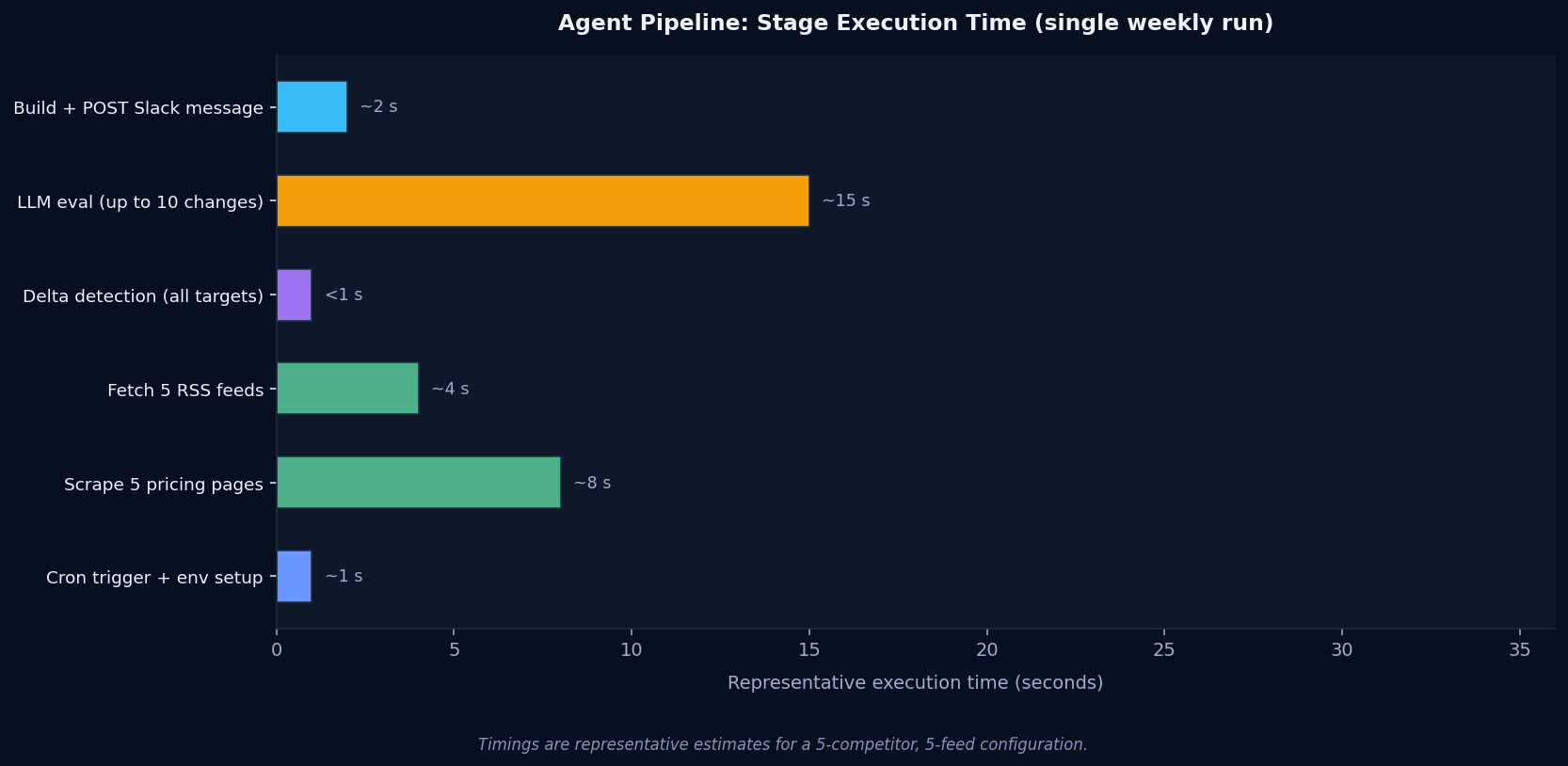
Run the agent for the first time from your local machine to establish the initial baseline. No Slack message goes out on that first run; the delta detector has nothing to compare against yet. On the second run and every run after, it will compare against what was collected the first time and report only genuine changes.
python agent.py
# [CI Agent] Starting run: August 26, 2026
# [CI Agent] Scraping pricing pages...
# [CI Agent] Fetching RSS feeds...
# [CI Agent] Pricing deltas: 0 | New RSS entries: 0
# [CI Agent] Slack message posted.
# [CI Agent] State saved. Run complete.
Extending the Agent
The six-module structure is deliberately extensible. Adding a new data source means writing one new function in the scraper module, adding an entry to the targets list in config.py, and letting the existing delta detector and LLM evaluator handle the rest. No changes to the core pipeline are needed.
Some extensions worth considering:
- G2 and Capterra review pages: scrape the summary statistics section on each competitor's review page and hash the aggregate rating and review count. A sudden jump in reviews after a product launch is a signal worth surfacing.
- Job board postings: a competitor posting five senior ML engineer roles in a week signals a product direction before any press release does. The LinkedIn Jobs API is rate-limited for unofficial access; a simpler approach is scraping their public jobs page or using a provider like Apify for structured job data.
- GitHub repository activity: the GitHub REST API exposes recent commits, releases, and topic tags for public repositories. A competitor open-sourcing a previously proprietary tool or tagging a new release is a meaningful competitive signal with zero scraping required.
- App store release notes: iOS and Android app stores both have public RSS feeds for app updates. The release notes for a competitor's mobile app often describe new features more directly than a press release.
If you find the agent surfacing too much noise from a particular source, adjust the significance score threshold in the Slack notifier: filter out results with a score below 2 or 3 rather than below 1. The LLM scoring step gives you a numeric lever to tune signal-to-noise without modifying the scraper or detector logic.