Developers now use AI for almost everything except reviewing the code it helped write. The Stack Overflow 2024 Developer Survey found that 82% of developers use AI tools to write code, but only 13.2% use AI tools for committing and reviewing it. That gap is where an AI code analyzer earns its place in the workflow: it applies the same pattern-matching power used to generate code toward checking it, at a scale no human reviewer can match line by line.
This guide explains what an AI code analyzer actually is, how it works under the hood, what it catches and what it does not, and how the leading tools compare on real 2026 pricing. No vendor talking points, just what these tools do and what they cost.
What Is an AI Code Analyzer?
An AI code analyzer is a tool that inspects source code, usually on every commit or pull request, and flags bugs, security vulnerabilities, and quality problems automatically. The "AI" part refers to how the tool finds issues: instead of relying only on a hand-written list of rules, it uses machine learning models trained on large volumes of code, and increasingly large language models, to recognize patterns a fixed rule set would miss.
The category covers a wide range of products. Some, like SonarQube, started as traditional static analysis engines and layered AI-assisted detection and fix suggestions on top over time. Others, like DeepSource and Qodo, were built AI-first, combining static analysis with model-based review from the start. GitHub Copilot's code review feature and Snyk Code sit somewhere in between: an AI layer wrapped around a security-focused or general-purpose static engine.
What they share is the goal: catch problems before they reach production, without requiring a human to read every line of every diff.
How an AI Code Analyzer Works
Most tools in this category run three types of checks, either separately or blended into a single pass.
Rule-based static analysis
This is the foundation almost every tool still relies on. The analyzer parses your code into an abstract syntax tree and checks it against a library of known patterns: unused variables, unreachable code, unparameterized SQL queries, missing null checks, and dozens of other categories specific to each language. This is deterministic and fast, and it is why tools like SonarQube and ESLint have worked well for over a decade without any machine learning involved.
Machine learning pattern detection
Layered on top, ML models trained on millions of real commits learn to recognize code that resembles known bug patterns, even when no explicit rule matches it. This is how a tool can flag a function that looks structurally similar to a documented vulnerability in a public CVE database, without anyone writing a rule for that exact shape of code. DeepSource describes its own engine, on its pricing and marketing pages, as a hybrid of static analysis and AI review that claims 82% accuracy on real vulnerabilities in its own testing; that figure comes from the vendor, not an independent audit, so treat it as a marketing data point rather than a verified benchmark.
LLM-based contextual review
The newest layer uses large language models to read a diff the way a human reviewer would: understanding what the change is trying to do, not just matching syntax patterns. This is what powers tools like Qodo's pull request review and GitHub Copilot's code review feature. It catches issues that need context, like a function that handles an edge case correctly in isolation but breaks an assumption made elsewhere in the file. It also produces more false positives than rule-based checks, because language models can misread intent.
Ask any vendor exactly which of these three layers their product uses before buying. "AI-powered" on a landing page can mean anything from a single ML classifier bolted onto an old rule engine to a full LLM review pipeline. The answer changes what the tool is actually good at.
Where AI Code Analysis Fits in the Developer Workflow Today
The adoption data backs up why this category is growing. Stack Overflow's 2024 survey asked developers which parts of their workflow they currently use AI tools for. Writing code led by a wide margin. Reviewing and committing code came in last, at 13.2%, even though 63.3% of professional developers say AI tools lack sufficient context of their own codebase and 66.2% say they do not trust AI output outright.
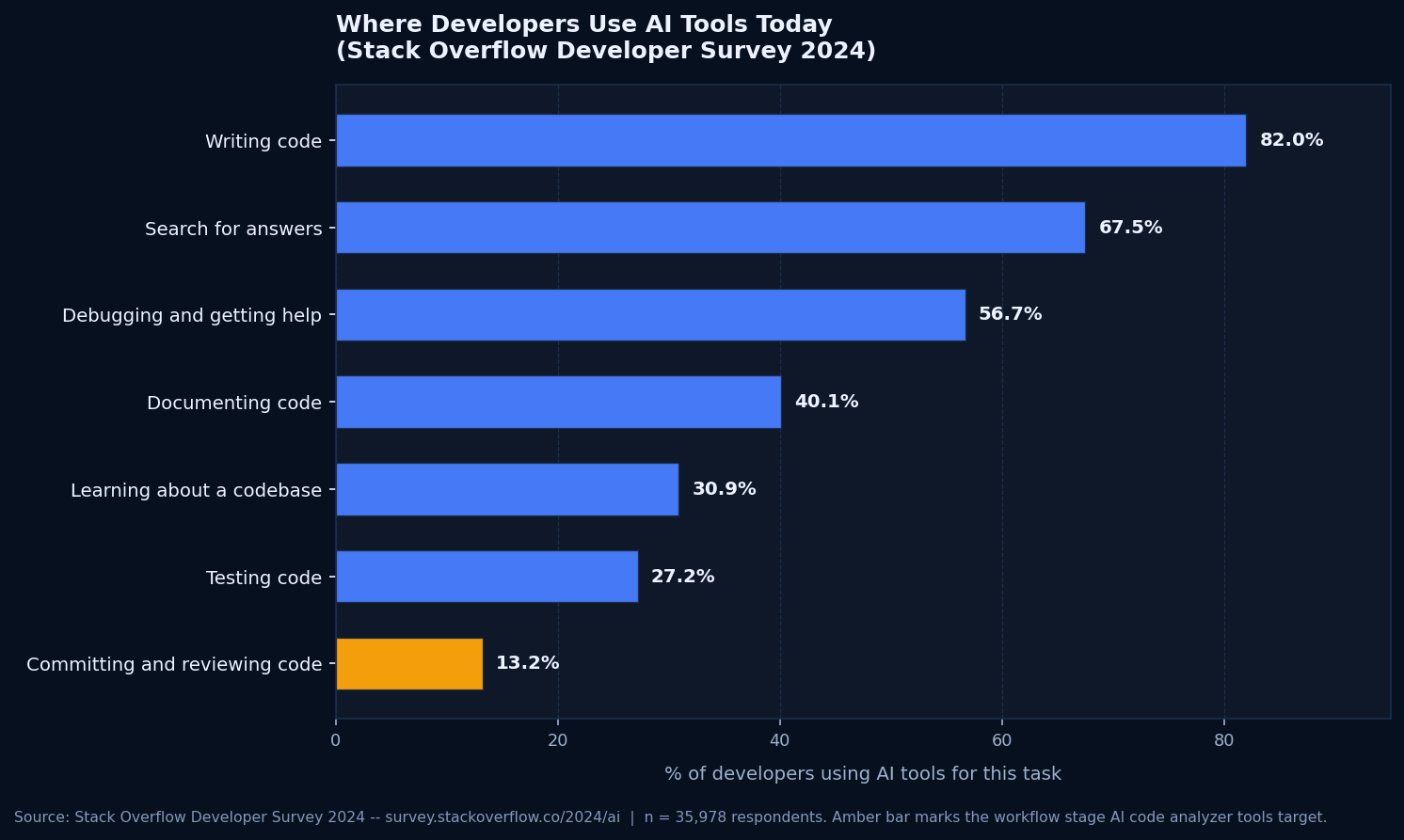
Put together, those numbers describe a specific problem: developers are shipping more AI-written code than ever, but the step that would catch its mistakes is the one they trust AI with least. An AI code analyzer that runs quietly in CI, flags a ranked list of issues, and leaves the judgment calls to a human is a more realistic fit for that gap than asking developers to trust a model's opinion wholesale.
What an AI Code Analyzer Actually Catches
The categories below cover what these tools check for across the market, though coverage differs by vendor, language, and plan.
Bugs and logic errors
Null reference risks, off-by-one errors in loops, unreachable branches, unhandled exceptions, and type mismatches. This is the closest thing to a solved problem in the category; rule-based static analysis has caught these reliably for years, and AI models mostly add coverage for patterns a fixed rule set does not describe.
Security vulnerabilities
SQL injection, cross-site scripting, path traversal, hardcoded credentials, insecure deserialization, and missing authentication checks. Most tools map their findings to the OWASP Top 10, the industry-standard list of the most critical web application security risks, so findings can be prioritized against a recognized severity framework instead of a vendor's own scoring system.
Code smells and maintainability issues
Duplicated blocks, functions that have grown too large or too complex to reason about, deep nesting, and inconsistent naming. These do not cause outages on their own, but they are the reason a change that should take an hour takes a day, because no one can safely predict what else a function touches.
Secrets and dependency risks
Hardcoded API keys and tokens committed by accident, and known vulnerabilities in third-party packages your project depends on. Snyk built its entire product around this category before expanding into broader static analysis, and most competitors now offer some version of dependency scanning alongside their core code checks.
Top AI Code Analyzer Tools Compared (2026 Pricing)
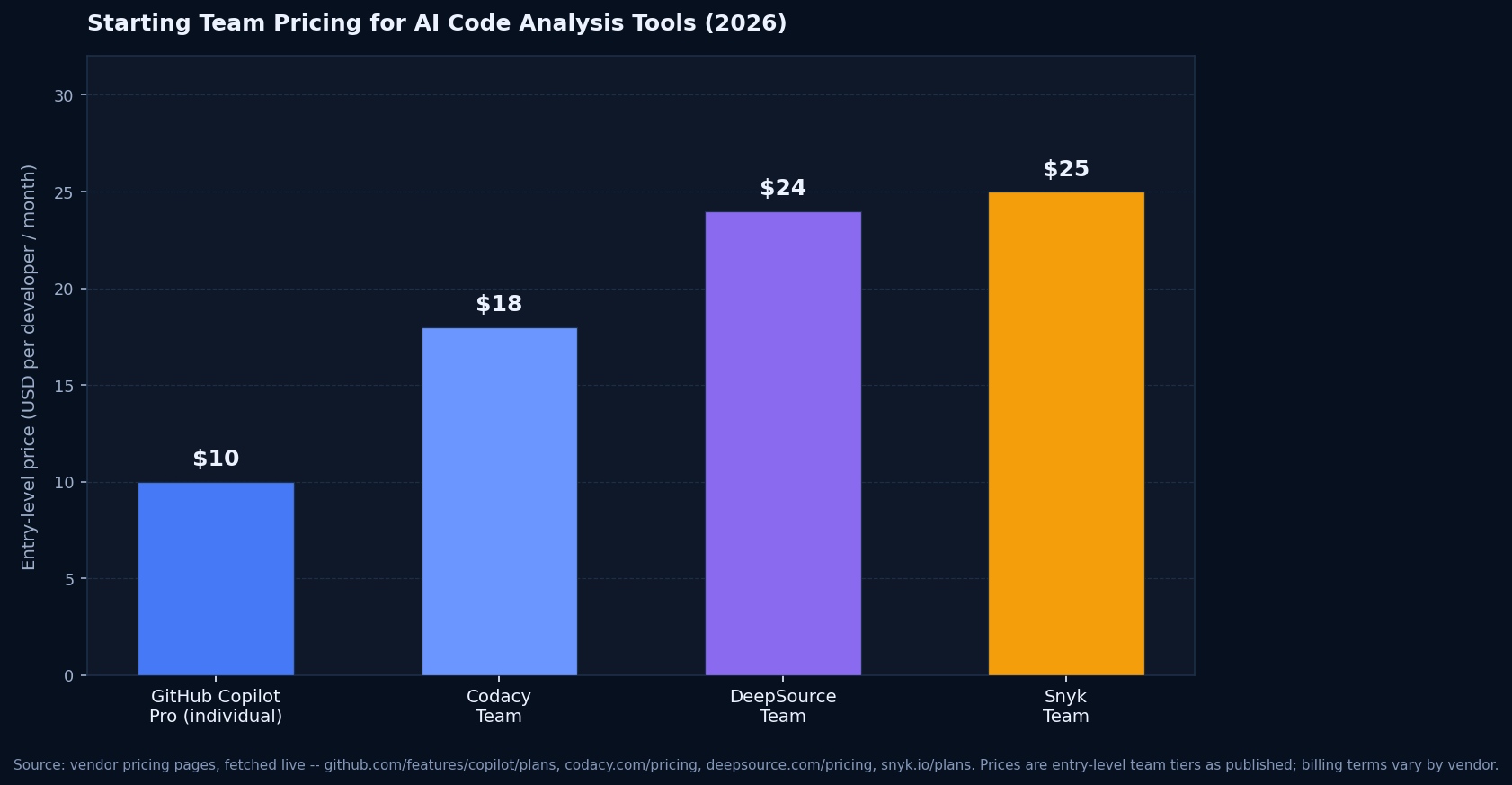
Pricing models in this category vary more than the feature lists do. Some charge per developer seat, one charges by lines of code analyzed, and one is usage-based on review credits. The figures below are entry-level team pricing pulled directly from each vendor's own pricing page.
SonarQube (SonarSource)
From $34/month, priced by lines of codeTeam plan analyzes up to 100k lines of code and covers 30+ languages, bug and vulnerability detection, secrets scanning, and AI-driven fix suggestions. Pricing scales with lines of code analyzed, not seats, so cost depends on codebase size rather than headcount. Enterprise adds OWASP/CWE/PCI DSS compliance reporting and unlimited users.
DeepSource
Team: $24/user/month, billed yearlyUnlimited pull request reviews and code formatting on the Team plan. AI Review and Autofix run on a pay-as-you-go credit model layered on top of the seat price, billed per 10K lines of code processed. Open source projects get the platform free.
Codacy
Team: starts at $18/developer/monthCloud-hosted quality and security scans across 49 languages, an AI reviewer for pull requests, merge gates, and malicious package detection. A free IDE plugin gives individual developers real-time scanning without a paid plan.
Snyk Code
Team: starts at $25/month per developerPart of the broader Snyk AI Security Platform, covering static code analysis (SAST), open source dependency scanning, and infrastructure-as-code checks in one product. The free tier covers individual developers and small teams with reduced test limits.
Qodo (formerly CodiumAI)
Pro Team: usage-based, $0.012 per creditAgentic pull request review with rules that adapt to your codebase over time. Priced on pooled review credits shared across the team rather than a flat per-seat fee, so cost tracks actual review volume instead of headcount.
GitHub Copilot (code review)
Pro: $10/month per userCode review is bundled into Copilot Pro rather than sold as a standalone product, alongside code completion and a cloud coding agent. Convenient if you are already paying for Copilot, but it is not a dedicated analysis platform the way the others on this list are.
How to Choose the Right AI Code Analyzer
The right tool depends on what you are actually trying to fix, not which vendor has the longest feature list.
Identify your primary risk first
Security-heavy teams handling payment or health data should weight OWASP coverage and dependency scanning over general code style checks. Teams struggling with maintainability on a fast-growing codebase should weight code smell and complexity detection instead. Few teams need everything at once.
Check language and framework coverage
A tool with excellent Python support and thin Go support is a bad fit for a Go-heavy backend, no matter how strong its marketing is. Check the vendor's own supported-language list, not a comparison page written by a competitor.
Trial it against your own repository
Every vendor demo looks clean because it runs against a curated sample repo. False-positive rates only become clear once you point the tool at your actual, messy, years-old codebase during a free trial.
Confirm it fits your existing CI and PR workflow
The tool should comment on pull requests where your team already works, in GitHub, GitLab, or Bitbucket, without a separate dashboard nobody remembers to check. If reviewing results requires leaving your existing workflow, adoption drops fast.
Price it at your real team size and codebase size
Per-seat pricing and per-LOC pricing scale very differently. A ten-developer team with a small codebase might do better on SonarQube's LOC-based model; a large monorepo with a small team might favor a flat per-seat plan instead. Run the math on your actual numbers, not the vendor's example.
Pilot on one repository before rolling out org-wide
Turn the tool on for one active repository for two to three weeks before enabling it everywhere. That is enough time to see the real false-positive rate, tune severity thresholds, and decide whether developers actually act on what it flags.
What AI Code Analyzers Still Miss
None of these tools understand your product. They can tell you a function has no null check. They cannot tell you whether the feature it implements is the right feature to build, or whether a business rule was translated correctly from a requirements document into code. Stack Overflow's 2024 survey found that 45% of professional developers rate AI tools as bad or very bad at handling complex tasks, and 63.3% say AI tools lack sufficient context of their own codebase. Both numbers describe the same limitation from different angles: pattern matching is not the same as understanding intent.
False positives are the other constant. A rule that flags every use of a particular function as risky will also flag the cases where that use is completely fine, and a team that gets buried in noise will start ignoring the tool altogether. The tools that work best in practice are tuned against a real codebase over the first few weeks, not left on default settings.
Treat an AI code analyzer as a fast, tireless first pass that clears the repetitive checking work off a human reviewer's plate. The judgment calls it cannot make, architecture decisions, security tradeoffs specific to your business, and whether code actually does what the product needs, still belong to a person who understands the system, not a tool scanning a diff in isolation.
If an AI code analyzer keeps surfacing the same class of issue across your codebase and no one has time to actually fix the backlog, that is exactly what we do at Prompt2Prod.AI. A focused production-readiness assessment turns a long list of flagged issues into a prioritized plan and closes the gaps that actually carry risk.