
Two things are happening in parallel right now. AI adoption in software development keeps climbing: Stack Overflow's 2025 Developer Survey found 84% of developers use or plan to use AI tools, up from 76% in 2024. At the same time, developer trust in that output keeps falling: only 33% trust AI accuracy, and 66% name "solutions that are almost right, but not quite" as their top frustration. AI agents coding are the technology sitting at the center of that tension, promising to handle entire tasks while the trust data suggests most teams are not yet ready to hand over the controls.
This article explains what AI coding agents actually are, how the agentic loop works under the hood, where the leading tools stand on real 2026 pricing, and what you actually need to watch out for before letting an agent run loose on a production codebase. No hype, no vendor comparisons built from press releases. Just what the tools do and what they cost.
What Is an AI Coding Agent?
A code assistant gives you a suggestion. An AI coding agent takes a goal and runs with it.
Specifically, an AI coding agent is a software system that takes a natural-language task description, uses a large language model to plan the steps required, and then executes those steps by calling tools: reading files, writing changes, running shell commands, checking test output, and iterating based on what it sees. The key word is executes. A code assistant waits for you to move the cursor or press a key. An agent keeps going until it finishes the task or hits something it cannot resolve.
The term "agent" here means the same thing it means in AI research generally: a system that perceives its environment, takes actions in it, and adjusts its behavior based on the results. For a coding agent, the environment is your repository: files, terminal, test runner, and sometimes a browser or API endpoint.
This is a meaningful departure from what most developers spent 2023 and 2024 doing with AI. Chat-based code generation and autocomplete are reactive tools. You prompt them; they respond once. AI agents coding are proactive in the sense that a single high-level instruction can trigger dozens of sequential file reads, edits, and command executions without you intervening in between.
How the Agentic Loop Works
Understanding what happens inside the loop helps set realistic expectations for what agents can and cannot do.
Step 1: Planning
Given a task like "add input validation to the registration endpoint and write tests for the new checks," the agent first uses its language model to reason about what steps are needed. This is sometimes called a chain-of-thought pass or a scratchpad. The model reads relevant files to understand the current structure, identifies what needs to change, and generates a sequence of actions to take. This planning step is where the agent's context window matters most; a model with a short context window will miss code that is not in the first files it reads.
Step 2: Executing
The agent then executes the plan one step at a time, calling tools after each action. It might read three files, write changes to two of them, run the test suite, read the failure output, and then go back and fix the error it introduced. This loop (act, observe, act again) is the core of agentic behavior. It is also where most real-world failures happen: the agent edits a file based on what it saw in step 3, but the file has already changed from an earlier edit and the agent does not realize it.
Step 3: Reporting back
When the agent finishes or gets stuck, it reports what it did. Most tools show a diff of every file changed, a summary of actions taken, and any errors it could not resolve. This is the point where human review is non-negotiable. The agent's summary is not a substitute for reading the diff; agents frequently describe what they intended to do, not what actually happened in the code.
Before running any agent on your codebase, check whether it will automatically commit or push changes. Several tools can be configured to commit directly to a branch. That is a sensible default for a throwaway sandbox; it is a liability on a shared feature branch where other developers are working.
Where AI Agents Stand in Developer Adoption Right Now
The adoption picture for AI agents coding is more uneven than the general AI-in-development story suggests. Stack Overflow's 2025 survey separated general AI tool use from agent use specifically, and the numbers look quite different. While 47% of all respondents use AI tools daily, only 14.1% use AI agents daily, and another 9% use them weekly. A full 38% have no plans to adopt agents at all.
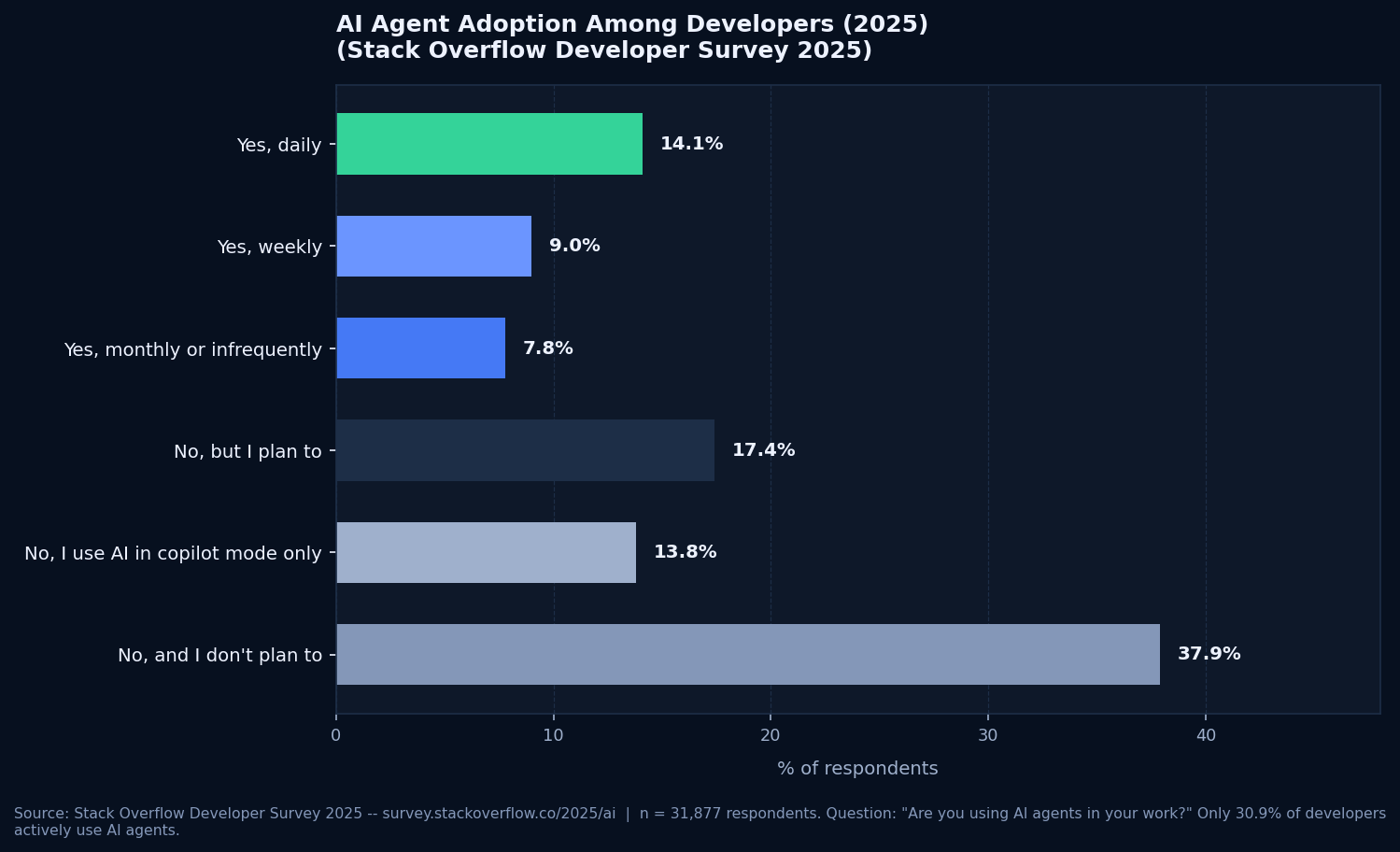
Of the developers who do use agents, 83.5% use them for software engineering specifically, so the population using agents for coding tasks is fairly concentrated. Those users also report strong satisfaction: 52% of all respondents say AI tools and agents have had a positive effect on their productivity. The catch is that the other 48% range from "not much change" to "things got harder." The gap between those two groups mostly comes down to task selection: agents work well on bounded, well-specified tasks and poorly on open-ended work where the requirements are not fully defined.
The Leading AI Coding Agent Tools in 2026
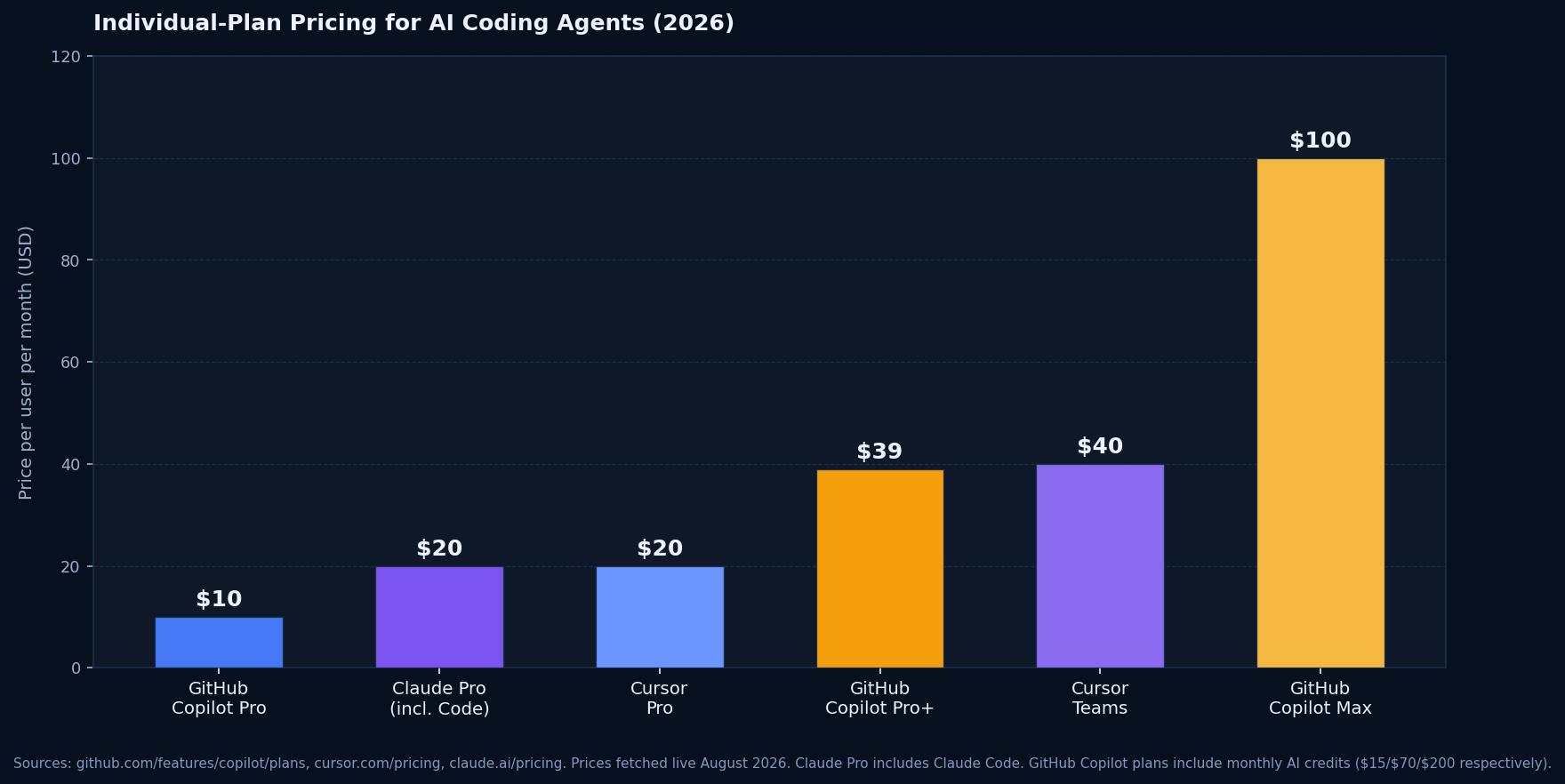
Three tools dominate practical day-to-day AI agents coding work: GitHub Copilot's agent mode, Anthropic's Claude Code, and Cursor's agentic editor. They differ in how they expose the agent to you, what controls you have over the execution, and how much the plan costs. The pricing figures below are taken directly from each vendor's live pricing page.
GitHub Copilot (agent mode)
Pro: $10/mo · Pro+: $39/mo · Max: $100/moAgent mode in VS Code and other supported IDEs lets Copilot plan and execute multi-file changes from a single chat instruction. The Pro plan includes $15 in monthly AI credits covering chat, agent sessions, and the cloud coding agent; Pro+ includes $70; Max includes $200. Agent mode is also available directly on GitHub via the cloud coding agent, which accepts issues as input and runs tasks on a hosted machine. Pricing confirmed at github.com/features/copilot/plans.
Claude Code (Anthropic)
Included in Claude Pro: $20/mo (or $17/mo annual)Claude Code runs in your terminal, in VS Code and JetBrains IDE extensions, in GitHub Actions, and via a desktop app. It works directly on your local codebase, reading and writing files with explicit confirmation checkpoints you can configure. Claude Pro at $20/month (or $17/month billed annually) includes Claude Code access, along with the rest of Claude's features. The heavy-usage Max plan starts at $100/month. Pricing confirmed at claude.ai/pricing.
Cursor (Agent mode)
Hobby: Free · Pro: $20/mo · Teams: $40/user/moCursor is a purpose-built agentic code editor that reimagines the IDE around agent-first workflows. Agent mode reads your codebase, plans changes, edits multiple files, runs terminal commands, and uses MCP tool calls, all from a single instruction. The Hobby plan includes limited agent requests. Cursor Pro at $20/month includes extended agent limits and access to frontier models. The Teams plan at $40/user/month adds shared context, Bugbot for agentic code reviews, and centralized billing. Pricing confirmed at cursor.com/pricing.
What AI Coding Agents Are Actually Good At
The honest answer is: well-defined, bounded tasks on a codebase the agent can fully read in a single context window.
Test generation
Give an agent an existing function and ask it to write a comprehensive test suite, including edge cases. This is one of the strongest use cases. The task has clear success criteria: the tests pass or they do not. The scope is limited to one or a few files, and the agent does not need to understand business requirements to generate valid assertions against the existing behavior. Stack Overflow's 2025 survey shows testing code is one of the areas where developers report the highest satisfaction with AI tools, and agents can take that further by running the tests themselves and fixing failures in the same session.
Boilerplate and scaffolding
Creating a new REST endpoint following your existing patterns, generating a data migration file from a schema diff, setting up a new module with the standard structure your project uses. These are all tasks where an agent can read your existing code as reference and produce new code that matches it. The work is repetitive and pattern-following by nature, which is exactly what language models do well.
Repetitive refactors
Renaming a function across every file that imports it, updating all call sites to a new API signature, converting a set of callback-based functions to async/await. Agents handle these reliably because the transformation rule is consistent and verifiable. An automated rename across 80 files that would take a developer 90 minutes to do carefully takes an agent a few minutes, and the diff is easy to review because every change looks the same.
Documentation generation
Writing docstrings, generating a README from the codebase, adding inline comments to complex sections of existing code. The agent can read the implementation and produce accurate documentation without you having to summarize it manually. This requires verification: agents occasionally misread what a function does, but the error rate is low enough that reviewing generated documentation is faster than writing it from scratch.
What AI Coding Agents Still Get Wrong
Stack Overflow's 2025 survey put the top developer frustration at 66%: "AI solutions that are almost right, but not quite." For agents that make changes autonomously, "almost right" is a more expensive problem than it is for a code suggestion you can just ignore.
Context blindness
An agent reads what is in its context window. It does not know about the Slack conversation where your team decided that module X should never be modified directly. It does not know the security invariant written in a comment that got deleted six months ago. It does not know that the function it just refactored is called by a background job that runs at midnight and is not covered by any test. These gaps are not failures of the AI technology; they are gaps in what is written down and accessible. Agents make them expensive because a fast, multi-file edit can bury a broken assumption across ten files before anyone checks.
Silent breakage
Agents that run tests as part of their loop catch regressions they introduce. Agents that do not run tests, or that run an incomplete test suite, ship broken changes with confidence. The test output is green because the tests do not cover the broken path, not because the code is correct. This is a property of the codebase's test coverage, not the agent itself, but it means an agent's output is only as trustworthy as the tests it can run against it.
Cascading edits
In a large codebase, a multi-file refactor done by an agent can create a diff that is too long to review quickly. Developers are less likely to catch subtle errors in a 200-file diff than in a 5-file diff; the agent has no way to know which parts of a large diff are routine and which are risky. The practical safeguard is constraining the agent to a specific scope before it starts, not after it finishes.
Prompt injection via code comments
This is a real and documented risk. If your codebase contains comments or strings that look like instructions, placed there intentionally by someone with write access, or injected through a dependency, an agent reading those files may follow those instructions instead of yours. Review your agent's permissions carefully, and treat any tool that can push directly to a remote branch as a security boundary, not a convenience.
How to Use AI Coding Agents Without Burning the Codebase
Start with a clean branch and staged environment
Run agents on a dedicated branch, not main. If the agent has shell access, point it at a development database, not production. Reversing a bad agent session is much easier from a branch than from a direct commit to a shared environment. Some teams run agents in a container specifically to limit what the shell access can touch.
Define the task scope before you start
The more specific the task, the more useful the output. "Improve this codebase" produces sprawl. "Add Zod validation to the three POST endpoints in src/routes/auth.ts and write unit tests for each validation rule" produces a diff you can actually review. If you cannot define the scope precisely enough to hand it to a careful junior developer, the agent will struggle with it too.
Give it the context it cannot infer
Database schema, API contracts, environment variable names, module boundaries that are architectural decisions rather than obvious from the file structure. Paste these into the agent's context before it starts. An agent that knows your data model produces better migrations than one guessing from ORM code. An agent that knows your security requirements makes different choices than one optimizing only for functionality.
Review the full diff, not the summary
Agents produce accurate summaries of what they intended to do. Read the actual diff. Pay particular attention to changes in files the agent did not explicitly mention. Those are where unintended side effects hide. Run your test suite after the agent finishes, and do not merge anything that makes the suite worse than it was before.
Check agent permissions against your security policy
Most AI coding agent tools can be configured to ask for confirmation before writing files, running commands, or making network requests. Enable those confirmation checkpoints when you are learning how an agent behaves on your codebase. You can relax them later on tasks you have already vetted. An agent with unchecked shell access and network access on a production machine is a significant attack surface if the tool is ever compromised or tricked by injected content.
Treat the first month as calibration, not production use
Run the agent on low-risk tasks for the first few weeks: test generation, documentation, boilerplate for new modules. This builds a realistic picture of where the agent produces trustworthy output on your specific codebase and where it consistently gets things wrong. That picture is more useful than any benchmark, because it describes performance on your actual code, not a vendor's demo repository.
If your team is already using an agent and finding a growing backlog of agent-introduced issues that nobody has time to review and fix, that is the exact problem we address at Prompt2Prod.AI. A production readiness assessment identifies which agent-introduced patterns carry real risk, and a focused engagement closes them before they reach users.